 Games
Games  Log in
  Live
Live  Promotions
Overview of CrownJewelz Mobile App
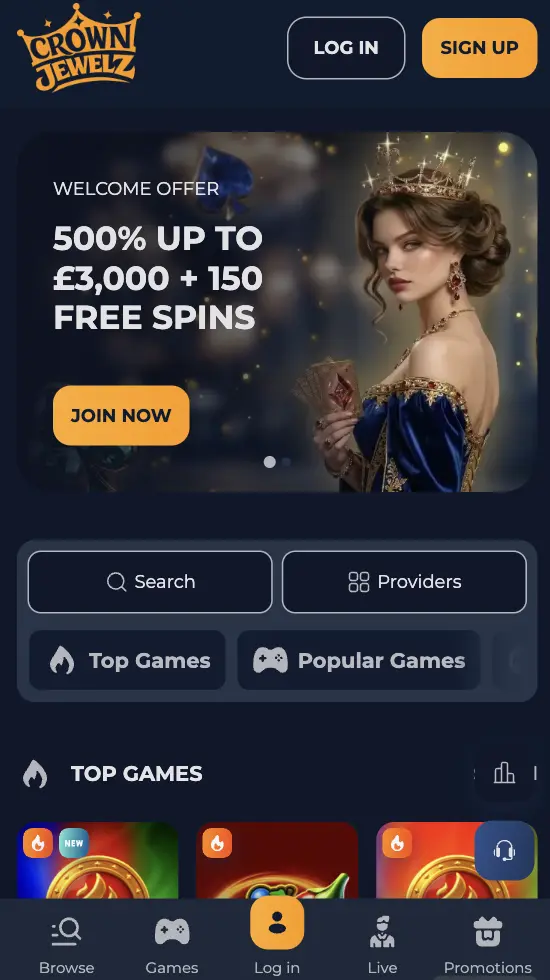
There’s a Progressive Web App that requires 100 MB max storage space on your phone without a need to use either Apple or Google Play stores. PWA offers the same features on your iOS, Android or Windows device. Casino CrownJewelz app supports deposits, withdrawals, account management and a full game selection of 4,500+ titles.
How to Use the Crown Jewelz Casino App
The mobile version is available directly on the website. You’ll find it in the menu as the Download App button. When the Crown Jewelz mobile app is added to the home screen, it behaves like a regular APK from official stores.
How to Use and Install on Android
The whole procedure doesn’t take longer than 60 seconds to install the PWA for Android.
- Go to the casino website via Chrome.
- Tap the “Download App” button.
- Choose “Install app” or “Add it to my device”. The CrownJewelz app is installed, after installing it, you need to start it from your home screen.
- The PWA app closes the web tab and opens a standalone view where all functions the APK provides are readily available.
How to Use and Install CrownJewelz App on iOS
iPhone and iPad users can also install PWA directly from Safari. Here’s how:
- Navigate to the website on Safari.
- Click on the “Download App” or “Share” button (at the bottom of the screen).
- Click on “Add to Home Screen”.
- Launch the CrownJewelz Casino app from your home screen, and sign in.
The iOS PWA supports the same account features as the desktop website. Make sure to enable push notifications on iPhones and iPads if your device runs iOS 16.4 or later.
Available Device Types
The PWA can be installed on your phone, tablet or desktop. The CrownJewelz mobile app interface automatically adapts to different screen sizes, so you can use the full potential of the operator. You can also use the regular mobile version via your browser without software installation. The table below shows all available device options and their necessary technical requirements.
| Device Type | Supported Systems | Access Method | Main Advantages |
|---|---|---|---|
| Phone | Android 5.0+, iOS 13.0+ (16.4+ for push notification) | Chrome, Safari, PWA | Quick access, push notifications |
| Tablet | Android Tablets, iPadOS 16.4+ | Chrome, Safari, PWA | Larger display for more comfortable gaming |
| PC | Windows 10/11, macOS, Linux | Chrome, Edge, Firefox, Safari | Full-screen mode, multiple tabs support |
| Laptop | Windows, macOS, Linux | Chrome, Edge, Firefox, Safari | Desktop functionality, full portability |
CrownJewelz Mobile Interface
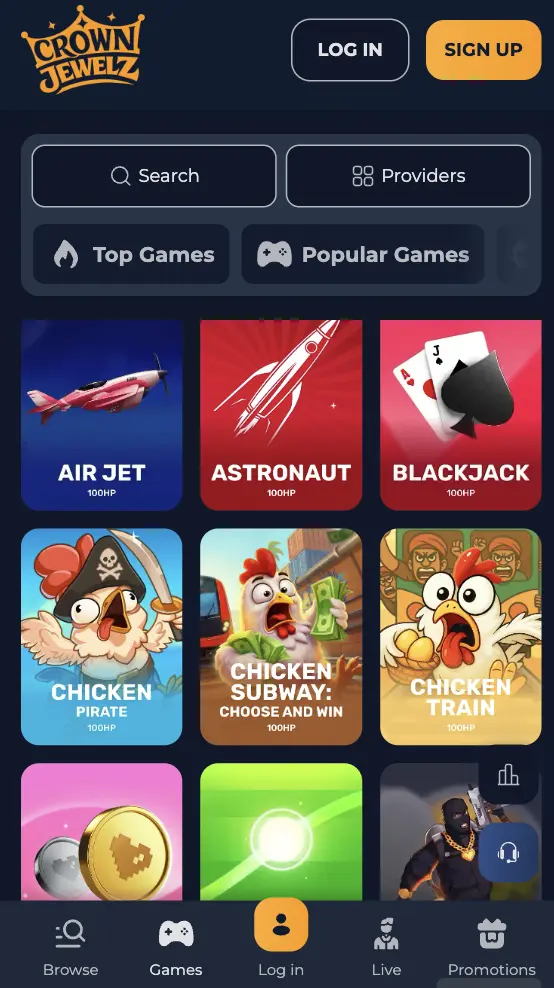
The CrownJewelz mobile app uses the same navy-blue and yellow theme as the desktop website. The main menu consists of the Live section, Slots, Promotions and Royal Fortune Draw. Additional sections like VIP Club, Tournaments, Referral Program and a link to Telegram can be found in the sidebar.
Finding games is easy thanks to the top navigation panel with a search button. You can choose between categories such as Slots, New, Instant Win, Bonus Buy, Megaways, Hold & Win and Collections.
Login and registration buttons are situated at the top. The buttons are large and easy to reach, as the application adjusts to different screen sizes while supporting all features.
Account Registration and Deposit
It will take you about 3 minutes to create an account and deposit money at Crown Jewelz Casino mobile app. Here’s how:
- Start the Registration: Tap the red Sign Up button at the top.
- Enter your data: Provide your information in the window that opens, including your email, phone number, country and currency. If you have a promo code, you can use it at this step. Also, come up with a secure password and tick the T&C box.
- Check information: Double-check your credentials and, if everything is correct, press Sign Up.
- Confirm your account: Click the link sent to your email inbox to confirm your profile.
- Make a deposit: Go to the Cashier section, choose your preferred payment method and top up money. You can also select a bonus if you wish. The money will be credited immediately and you can start playing real money games.
Benefits of Using Crown Jewelz App
Both desktop and Crown Jewelz mobile versions work well, without lags, and support all platform features. However, there are some clear advantages to using the application.
- Convenience: You have access to games directly from your home screen, with no need to open the website through a browser.
- Little storage space: The application doesn’t require much space, only about 100 MB to function fully.
- Support of all casino features: All games, including live titles, are available without limitations on CrownJewelz Casino app. Other features like registration, sign-in and deposits also work in the same way.
- Push notifications: You can enable push notifications for real-time account updates.
- Special offers for mobile users: Sometimes you can benefit from exclusive bonuses for using the app.
Bonuses for Mobile Players
Crown Jewelz Casino mobile app users can claim all standard bonuses, including the welcome pack, reloads, cashback and others. This table shows which rewards you’re eligible for:
| Type | Bonus | Conditions |
|---|---|---|
| Welcome Package | Up to £3,000 + 150 FS across 1st, 2nd, and 3rd top-ups | Bonus codes WELCOME1 / WELCOME2 / WELCOME340x bonus wagering requirement£20 minimum deposit per offer0x wagering on Free Spins (1st & 2nd deposits)7 days bonus duration |
| VIP 1st Deposit Offer | 200% up to £5,000 + 50 FS | Bonus code HIGH30x bonus wagering requirement£500 minimum deposit0x wagering on Free Spins (£1 value per spin)7 days bonus duration |
| Crypto Welcome Offer | 100% up to £500 | Bonus code CRYPTO40x bonus wagering requirement£20 equivalent minimum top-up in cryptocurrency7 days bonus duration |
| Reload Offers | Up to 75% match, up to 160 FS, or random wheel/chest rewards | Bonus codes TUE30 / TUE70 / TUE160 (Tue), CROWN (Wed), CHEST (Fri), WHEEL (Mon/Wed/Sat)30x–40x wagering requirement£20–£40 minimum top-up7 days bonus duration |
| Weekly Cashback | 2% up to 20% slot cashback (based on Royalty Club level) | 1x wagering requirementCredited every Tuesday by middayBased on slot losses > £200 from the previous 7 days2 days to activate, 7 days duration |
Security and Data Protection at CrownJewelz Casino App
All data transferred between your device and CrownJewelz Casino application is encrypted using SSL technology, as well as other security measures required by the regulator.
- 256-bit SSL encryption for payment transactions
- 2FA for secure logins
- KYC verification before withdrawals
- Anti-money laundering (AML) monitoring procedures
- Verified banking and crypto methods for protected payments
- Responsible storage and handling of personal information
The Crown Jewelz PWA offers the same level of security as the desktop version. Deposits, withdrawals and account management actions are processed through secure connections. All personal information is handled according to the privacy policy and applicable regulations.